How to Choose the Best CNC Laser for Your Business
Choosing the best cnc laser for your business starts with the work you need it to do. A machine that cuts thin acrylic quickly may struggle with thick steel or detailed engraving. Consider your materials, part sizes, daily production volume, and available floor space before comparing models. Small details matter: sheet dimensions, extraction setup, software compatibility, and the time needed to change jobs.
Laser-processing expert Dr. John Powell’s technical work offers a useful principle, paraphrased here: “Match the laser process to the material and the job.” Treat that as guidance, not a substitute for checking a machine’s specifications. Ask suppliers for sample cuts using your actual materials. Inspect the edge quality, speed, and consistency. A glossy brochure cannot show every shop-floor surprise.
There is no perfect machine for every business. A lower purchase price may bring slower output, extra setup, or service delays. Compare the total cost of ownership, including maintenance, training, consumables, and support. Speak with current users, review test results, and confirm what the warranty covers. Then weigh those findings against your production needs. Some uncertainty remains. Real workloads change, and early estimates can be wrong. A careful choice should still leave room for growth without paying for capacity your team will not use.
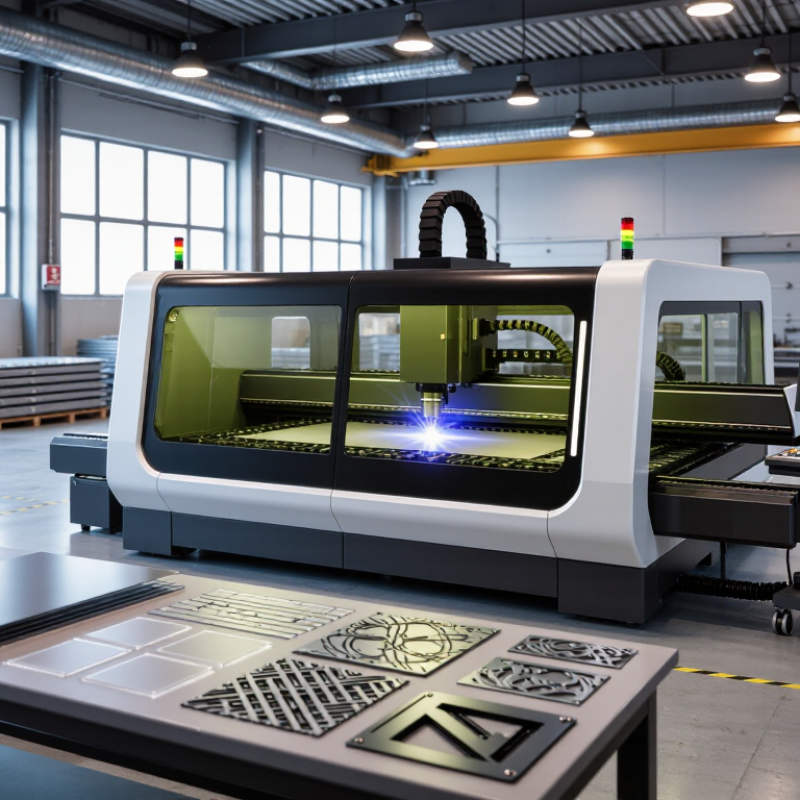
Define Your Production Needs and Target Materials
Define your production needs before comparing laser specifications. List weekly part counts, maximum sheet size, material thickness, edge-quality tolerance, and expected shift hours. A shop cutting thin stainless panels has different needs from one engraving wood signs or trimming acrylic. Fiber systems are commonly suited to metals; CO2 systems often suit wood, acrylic, and other nonmetals. Confirm compatibility with the exact material and coating, not just its category. Small details matter: a 3 mm sheet and a 12 mm plate can demand very different power and cutting speeds.
Production data helps frame the decision. Deloitte’s 2024 Smart Manufacturing Survey found that 86% of surveyed manufacturing executives expect smart manufacturing to drive competitiveness within five years. That makes machine monitoring and usable production records worth assessing, alongside cutting speed. The World Steel Association reported 1,892.2 million tonnes of crude steel production in 2023, illustrating the scale of metal manufacturing—but global volume cannot predict your shop’s workload. A spreadsheet may miss setup delays. Measure them.
Tips: Bring representative offcuts to a supplier or test facility. Record cut time, edge quality, assist-gas use, and setup effort for each material. Check the available work area and ventilation, too. A neat sample cut is not the same as a reliable full shift.
Compare CNC Laser Types and Power Requirements
Choosing a CNC laser starts with the material, thickness, and daily workload—not the largest wattage on a sales sheet.
CO2 systems, commonly rated around 40–150 W in small workshops, suit wood, acrylic, paper, and some plastics. Diode units often use lower optical power for engraving and thin stock, but may struggle with production pace. Fiber lasers are designed for metals; cutting applications often begin around 1 kW, while marking needs far less.
Check the manufacturer’s tested cutting chart for your exact material and thickness. A number alone can mislead.
Electrical efficiency also affects operating cost. The U.S. Department of Energy’s 2015 Quadrennial Technology Review describes fiber lasers as substantially more efficient than conventional CO2 sources; commonly reported industrial ranges are roughly 25–35% for fiber and 10–15% for CO2. Treat these as indicative, since settings and machine design change results.
A 100 W CO2 machine may cut acrylic cleanly but be a poor choice for recurring metal work. Conversely, a high-power fiber source can be unnecessary for occasional engraving. I have seen buyers overlook extraction, cooling, and duty cycle when comparing power. That comparison is incomplete.
Ask suppliers for sample cuts, measured cycle times, and power draw under your intended workload.
Choose a Machine Size and Configuration
Machine size should match the parts you actually make, not the largest job you might receive someday. Measure your widest and longest materials, then allow room for loading and positioning. A sheet that fits the cutting bed may still be awkward to handle inside the machine. Measure twice.
Check the working area separately from the machine’s outside dimensions. A compact unit can need substantial floor space once you add an exhaust connection, access panels, and room for maintenance. Leave room. Before choosing a layout, sketch the machine and operator space on the workshop floor with tape. It is a simple check, and easy to skip when comparing specifications online.
Configuration depends on material, thickness, and workflow. A flatbed may suit sheet goods and repeated two-dimensional parts. A rotary attachment can help with cylindrical work, but it takes setup time and may reduce usable bed space. If you cut thicker material, confirm that the source, optics, and extraction system are suited to the task. Ask for sample cuts using your own material, then inspect edge quality and cutting time. One detail is often overlooked: a larger bed does not automatically improve output. If most jobs are small, extra capacity may mean more handling and higher costs. I would leave some flexibility in the plan; production needs have a way of changing.
Assess Precision, Software, and Safety Features
A CNC laser should match the work you actually produce, not just the finest resolution listed on a brochure. Compare positioning accuracy and repeatability, then test both with a small sample from your own material. Measure cut width, edge quality, and placement after several passes. A neat first cut is not enough. Ask for documented test conditions; speed, material thickness, and lens choice can change results. For software, check file compatibility, nesting, job previews, and whether operators can recover settings without rebuilding a file.
Safety deserves the same scrutiny as precision. Check for a fully enclosed beam path, functioning interlocks, emergency stops, and suitable fume extraction. The U.S. Bureau of Labor Statistics recorded 5,283 fatal work injuries across all industries in 2023; this figure is not specific to laser equipment, but it underscores why machine safeguards and training matter. Review the machine’s safety documentation and applicable standards with a qualified safety professional. I’d also check how easily staff can inspect filters and maintain interlocks—small oversights happen.
Tips: Bring a representative file and material to a supplier trial. Request repeatability results, inspect the cut edges under consistent lighting, and have an operator test the software workflow. Keep the test notes, even if they reveal a weakness.
How to Choose the Best CNC Laser for Your Business
Compare common laser-source wavelengths as one part of your buying decision. Wavelength can affect which materials absorb a laser’s energy; it does not, by itself, determine cutting precision.
When assessing a machine, also check: repeatable positioning and stated tolerances; software compatibility and workflow; and enclosure, interlocks, extraction, and other safety provisions. Confirm specifications against the materials and tasks you plan to run.
Compare Total Costs, Support, and Supplier Reliability
A CNC laser’s quoted price rarely reflects its full cost. Compare the purchase price with installation, extraction, training, maintenance, and likely downtime. Consumables such as lenses and nozzles may seem minor, but frequent replacement can change the yearly budget. Ask for a written estimate of routine service and common replacement parts. If production schedules are tight, calculate what an idle machine costs per shift. A spreadsheet can still miss something. Include less visible expenses, such as operator training and safe material handling.
Support matters after delivery. Before signing, ask who handles troubleshooting, what hours support is available, and whether remote diagnosis is included. Request a sample response to a realistic fault, such as inconsistent cutting on a familiar material. Check whether technicians can visit your site and how spare parts are stocked locally. Ask for references from businesses with similar workloads, not just similar machines. Supplier reliability shows in clear documentation, realistic lead times, and honest limits on what the system can process. It is easy to trust a polished demonstration; verify the details in writing. Mistakes happen. A dependable supplier should explain them plainly and offer a practical recovery plan.